تم الحل ✓
categoryهندسة حاسوب وشبكات
schoolبكالوريوس
event_available2026-07-14
السؤال
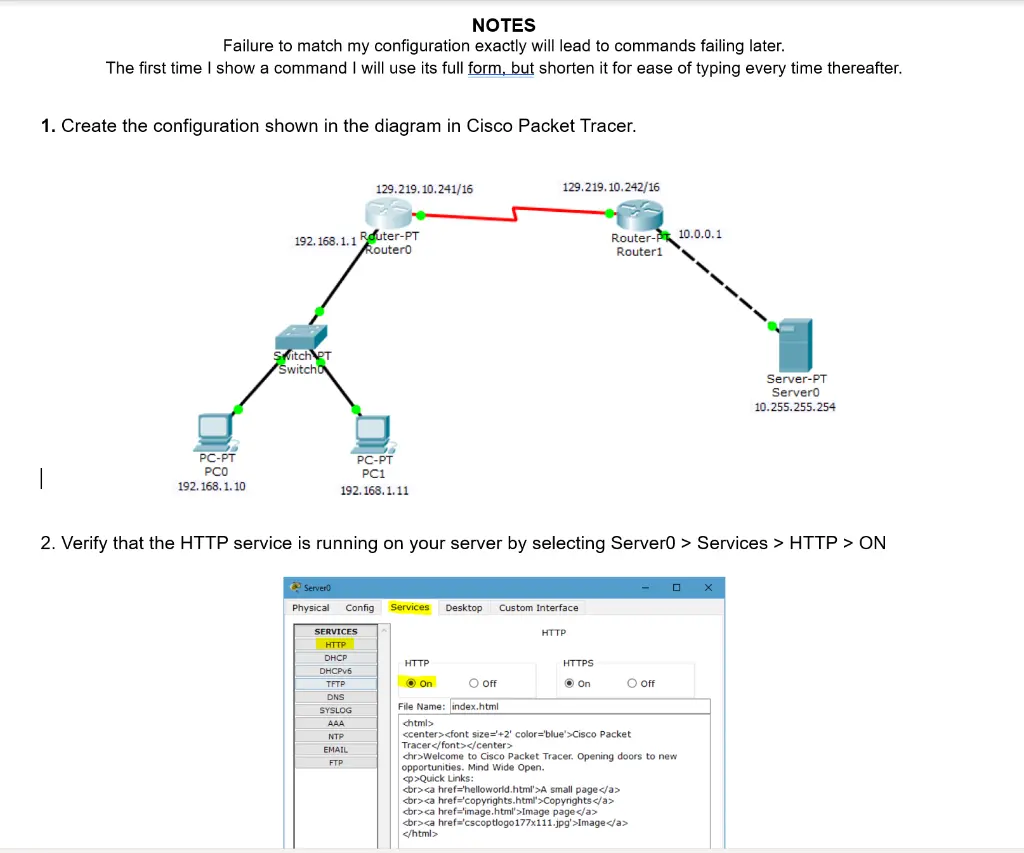
Transcribed Image Text:
NOTES
Failure to match my configuration exactly will lead to commands failing later.
The first time I show a command I will use its full form, but shorten it for ease of typing every time thereafter.
1. Create the configuration shown in the diagram in Cisco Packet Tracer.
129.219.10.241/16
192.168.1.1 Router-PT
RouterO
Switch PT
Switcho
129.219.10.242/16
Router- 10.0.0.1
Router1
Server-PT
Server0
10.255.255.254
|
PC-PT
PCO
192.168.1.10
PC-PT
PC1
192.168.1.11
2. Verify that the HTTP service is running on your server by selecting Server0 > Services > HTTP > ON
Server
Physical Config Services Desktop Custom Interface
SERVICES
HTTP
HTTP
DHCP
DHCPv6
HTTP
HTTPS
TFTP
On
○ off
• On
○ off
DNS
SYSLOG
AAA
NTP
EMAIL
<html>
FTP
File Name: index.html
<center><font size="+2' color='blue'>Cisco Packet
Tracer</font></center>
<hr>Welcome to Cisco Packet Tracer. Opening doors to new
opportunities. Mind Wide Open.
<p>Quick Links:
<br><a href='helloworld.html'>A small page</a>
<br><a href='copyrights.html'>Copyrights</a>
<br><a href='image.html'>Image page</a>
<br><a href='cscoptlogo177x111.jpg'>Image</a>
</html>
Router#enable
Router#configure terminal
Enter configuration commands, one per line. End with CNTL/Z.
Router (config)#ip nat inside source static 10.255.255.254 129.219.10.242
Router (config)#int 52/0
Router (config-if)#ip nat outside
Router (config-if)#int fa0/0
Router (config-if)#ip nat inside
Router (config-if)#
check_circle الجواب — حل مفصل خطوة بخطوة
hourglass_top
🔒
الحل الكامل متاح للمشتركين
اشترك في أرشيف الأسئلة لعرض هذا الحل وآلاف الحلول المفصلة خطوة بخطوة من معلمين معتمدين.