تم الحل ✓
categoryبرمجة وتطوير البرمجيات
schoolبكالوريوس
event_available2026-07-13
السؤال
Transcribed Image Text:
⚫ This project is meant to help the student build a whole integrated environment for a real life
Chess game system.
⚫ Students are required to build a Chess board with its moveable pieces.
In this project, students are required to create a chess board with moveable pieces, validate
these moves, and player's i
's interaction.
By the end of this project, you will experience the ability to write a computation problem of
moderate complexity in C.
II. LEARNING OUTCOMES
⚫ Students are to practice and use each and every topic of the advanced C programming course
in order to successfully complete this project.
Students are to go through the whole project life cycle from design, implementation, validation,
and testing.
By the end of the semester, students are expected to have implemented a real life project that
can be used to solve real life problem from beginning to end.
III. PROJECT DESCRIPTION
About Chess Game: The ancient game of Chess is played by two players, where two identical sets of pieces'
battle each other. Each set consists of eight pawns, two rooks, two knights, two bishops, one queen, and
one king. The initial configuration of the chess board or "chessboard" is composed of an 8x8 grid of 64
equal squares alternately light (the "white" squares) and dark (the "black" squares). The chessboard is
placed between the players in such a way that the near corner square to the right of the player is white. The
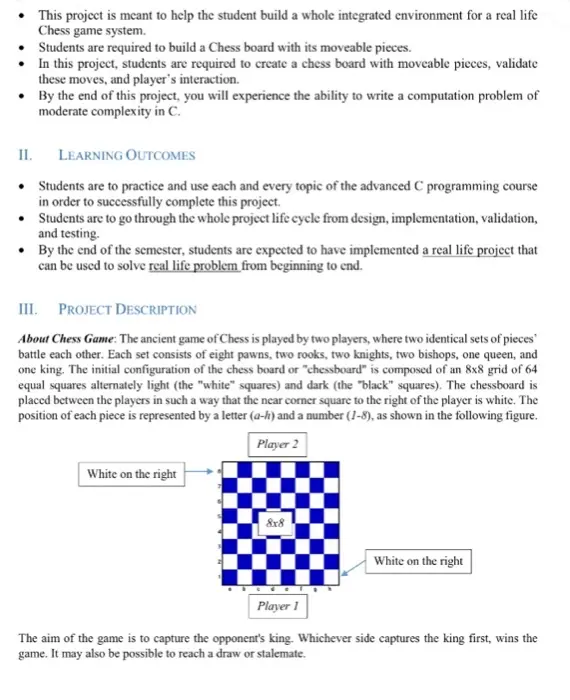
position of each piece is represented by a letter (a-k) and a number (1-8), as shown in the following figure.
Player 2
White on the right
8x8
White on the right
Player 1
The aim of the game is to capture the opponent's king. Whichever side captures the king first, wins the
game. It may also be possible to reach a draw or stalemate.
V. PROJECT SUMMARY (SCENARIO)
⚫ Chess is the most intelligent game ever invented. It has a lot of things that are similar to life.
It trains you to use lots all your resources to the maximum extent. It also teaches you lots of
lessons like: strategies, defend, defeat, concur, hide, plan, and much more.
The project will also present the opportunity for the students who did not know how to play
chess to learn the game.
This project will address a real-life application gaming problem, such that it will prepare
students for real-life business systems' analysis/design and implementation. It allows students
to explore the steps of both the analysis, design, and programming phases.
The project should address solutions for personal or small businesses by implementing a game
for beginners. This is accomplished through a well-designed and implemented Chess game
learning system to be developed by students using C.
VI. PROJECT REQUIREMENTS
You are required to use the techniques and methods taught during this course to design and
implement a chess board game using only C instructions. You may consider the following steps
as guidelines for this project:
A proper display menu is highly recommended (see below) to make your game user's friendly.
The user should be always provided with an update about the status of each step he/she chooses
to execute.
Welcome to CE264 Spring 2018 Project!
Please select:
1. Play
2. Save
3. Exit!
Check for improper inputs! For example, if the user chooses to select wrong option or bad input,
then you should notify him/her and update the menu.
If the user selects option Exit! it will exit the game.
If the user selects option Play, then, the chess game board should be created (which will look
roughly like previous figure) as follow:
Create a standard 8x8 chess board. Make sure you follow the correct board layout (row
index, column index) notation to specify the location of the piece.
Place the game pieces on the board as in the following figure:
& & & & & & & & 2
a b
cdefgh
For simplicity, you might represent the images on the board by their first letter.
pawns rooks knights bishops queen king
Player 1 P
R
N
B
Q
K
Player 2 P
r
n
b
q
k
Display another menu for the user to allow him to play the game and to let it move (i.e. ask
user What he would like to do next!).
■This submenu should at least contain options Move and Restart.
Restart: will re-set the game and set all pieces to its original position.
Move: allows the current player to move pieces to the desired position.
The white player usually starts the game!
Ask him which piece he would like to move (i.e. the coordinate of the piece).
Ask him to which location to move the piece.
➤ Determine if the move is legal or illegal. If the move is legal, allow the piece to move to
the desired location and re-display the board with the updated move.
If the move is illegal, print out an error statement stating illegal move and keep on
asking the user to enter a valid location for the piece.
P.S. To understand the concept of pieces' movement, please refer to Appendix A.
Once the white player finishes his move, the next move automatically goes to the second
player with the exact same steps above.
Keep on moving the knight, until one player wins or enters Exit!
If the user selects option Save, then it will save all the coordinates of the game movement
locations for each player into a .txt file.
VII. DELIVERABLES & PROJECT MANAGEMENT
Deliverable 1:
Flow Chart:
Part 1 project deliverable will be due at the end of week #5 and must be submitted through
Moodle. Failure to do so will result in a mark of zero.
The deliverable must include the source code of the program architecture. The structs
declaration, Functions headers and the main source code is needed. You need to provide the
abstract declarations without the implementation of all the functions body. Also you need to
provide a complete implementation of the main function.
This deliverable is a program that can be executed. Although, the execution of the program
will not provide the complete functionality of the system, it must permit the user to start move
pieces around the board without authenticate these moves.
To start with chess game, you have to know the basic and valid moves. The important thing to remember
is how to identify the pieces you are moving. In the following chess board, you will notice that the board
includes the numbers 1-8 along the right edge and the letters "a"-"h" along the bottom of the board. We
can use the combination of one letter and one number to describe each square on the chessboard.
5
4 a4 b4 c4 d4
3 a3 b3 c3 d3
8 8 8 8 8 8 8 8
2 a2 b2 c2 d2
1 al bl cl di
c de
h
cdefgh
Pieces Names:
Each side has 8 Pawns
Each side has 2 Knights
Each side has 2 Bishops
Each side has 2 Rooks
Each side has 1 Queen
Each side has 1 King
32
Moves:
1. Pawn
7 At the start of the game White's pawns stand on the 2nd
rank, and Black's stand on the 7th rank as in our next
diagram. A pawn can move straight ahead one or two
5 squares on its first move. After that, it can move only one
square at a time, even if it didn't go two squares on its first
move.
888888882
abcdefgh
2. Knight
The Knight moves in an "L" shape, two squares forward and
one to the side, or two squares sideways and one forward, or
two square backwards and one to the side.
3. Bishop
The Bishop moves diagonally (at a slant) stopping at any
empty square, according to choice. The Bishop may capture
any enemy piece or pawn in its path.
4.
Rook
The Rook moves horizontally and vertically in straight lines
stopping at any empty square, according to choice. The Rook
may capture any enemy piece or pawn in its path.
5.
Queen
The Queen moves horizontally and vertically and diagonally
stopping at any empty square, according to choice. Another way
to look at this is to say that the Queen combines the powers of the
Rook and bishop. The Queen may capture any enemy piece or
pawn in its path.
6.
King
The King moves only one square in any direction - horizontally,
vertically or diagonally. The King may capture any enemy piece
or pawn in its path.
*
check_circle الجواب — حل مفصل خطوة بخطوة
hourglass_top
🔒
الحل الكامل متاح للمشتركين
اشترك في أرشيف الأسئلة لعرض هذا الحل وآلاف الحلول المفصلة خطوة بخطوة من معلمين معتمدين.