تم الحل ✓
categoryتطوير تطبيقات الجوال
schoolبكالوريوس
event_available2026-07-15
السؤال
Transcribed Image Text:
Create Car Rent application using Flutter that meets the following requirements.
Task1: Each Car is described by by ID, CarModel, CarColor, Year, Price and Image.
It is your responsibility to assign the correct type for each property.
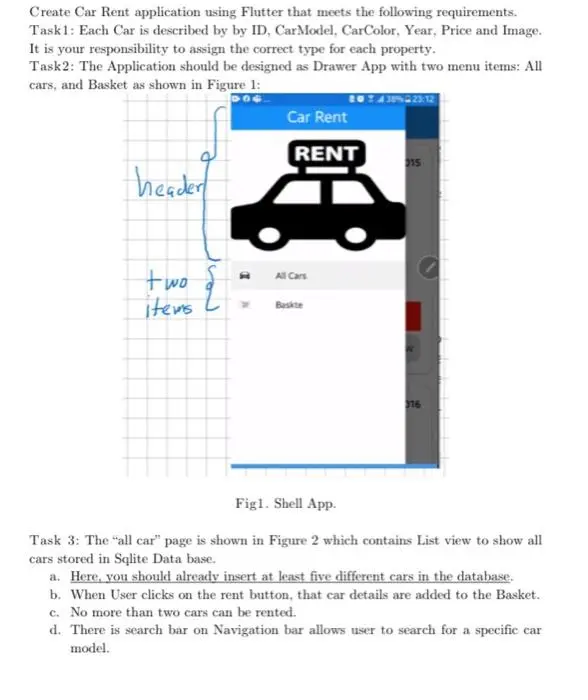
Task2: The Application should be designed as Drawer App with two menu items: All
cars, and Basket as shown in Figure 1:
header
4 38% Q 23:12
Car Rent
RENT
315
two
items L
All Cars
Baskte
316
Figl. Shell App.
Task 3: The "all car" page is shown in Figure 2 which contains List view to show all
cars stored in Sqlite Data base.
a. Here, you should already insert at least five different cars in the database.
b. When User clicks on the rent button, that car details are added to the Basket.
c. No more than two cars can be rented.
d. There is search bar on Navigation bar allows user to search for a specific car
model.
Label
to show
Car Model
Enter Car Model
Toyota
image.
TOYOTA
Price
20
→Search Bar to Search
for car model..
2015 Label
to show
Year
Sized Bax
To show car
RENT NOW to rent car.
BMW
M
2016
Figure 2. "All cars" Page
Task 4: Basket Page should be designed as shown in Figure 3 which is similar to
Figure 2.
a. The Basket Page consists of List View show all rented cars.
b. The Button in Figure 3 allows user to remove that item from Basket.
Toyota
2015
20
ΤΟΥΟΤΑ
REMOVE FROM LIST
Button to
remove the
car from Basket
Figure 3. Basket Page
check_circle الجواب — حل مفصل خطوة بخطوة
hourglass_top
🔒
الحل الكامل متاح للمشتركين
اشترك في أرشيف الأسئلة لعرض هذا الحل وآلاف الحلول المفصلة خطوة بخطوة من معلمين معتمدين.