تم الحل ✓
categoryبرمجة وتطوير البرمجيات
schoolبكالوريوس
event_available2026-07-15
السؤال
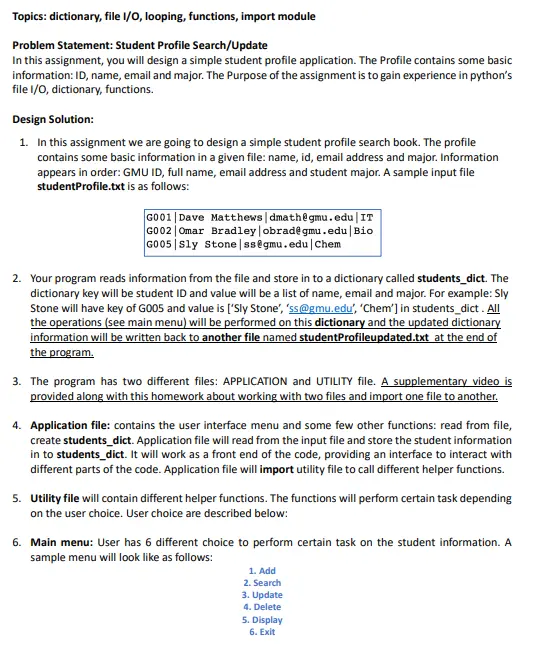
Transcribed Image Text:
Topics: dictionary, file I/O, looping, functions, import module
Problem Statement: Student Profile Search/Update
In this assignment, you will design a simple student profile application. The Profile contains some basic
information: ID, name, email and major. The Purpose of the assignment is to gain experience in python's
file I/O, dictionary, functions.
Design Solution:
1. In this assignment we are going to design a simple student profile search book. The profile
contains some basic information in a given file: name, id, email address and major. Information
appears in order: GMU ID, full name, email address and student major. A sample input file
studentProfile.txt is as follows:
G001 | Dave Matthews | dmath@gmu.edu | IT
G002 Omar Bradley | obrad@gmu.edu | Bio
G005 | Sly Stone | ss@gmu.edu | Chem
2. Your program reads information from the file and store in to a dictionary called students_dict. The
dictionary key will be student ID and value will be a list of name, email and major. For example: Sly
Stone will have key of G005 and value is ['Sly Stone', 'ss@gmu.edu', 'Chem'] in students_dict. All
the operations (see main menu) will be performed on this dictionary and the updated dictionary
information will be written back to another file named studentProfileupdated.txt at the end of
the program.
3. The program has two different files: APPLICATION and UTILITY file. A supplementary video is
provided along with this homework about working with two files and import one file to another.
4. Application file: contains the user interface menu and some few other functions: read from file,
create students_dict. Application file will read from the input file and store the student information
in to students_dict. It will work as a front end of the code, providing an interface to interact with
different parts of the code. Application file will import utility file to call different helper functions.
5. Utility file will contain different helper functions. The functions will perform certain task depending
on the user choice. User choice are described below:
6. Main menu: User has 6 different choice to perform certain task on the student information. A
sample menu will look like as follows:
1. Add
2. Search
3. Update
4. Delete
5. Display
6. Exit
a. Add: Add will allow the user to add a student information to the dictionary. This function will
ask for student ID, name, email and major. Then add the key-value pair to students_dict.
1. Add
2. Search
3. Update
4. Delete
5. Display
6. Exit
Enter your choice (1-6): 1
Enter student ID to add: G009
Enter full name: Janis Japlin
Enter email address: jj@email.net
Enter major: IT
Student information added successfully.
1. Add
2. Search
3. Update
4. Delete
5. Display
6. Exit
b. Search: Search is performed by student ID. User enters student ID and the program will
return the value by key ID from the dictionary. Sample as follows:
1. Add
2. Search
3. Update
4. Delete
5. Display
6. Exit
Enter your choice (1-6): 2
Enter student ID: G001
['Dave Matthews', 'dmath@gmu.edu', 'IT']
<main menu displays again>
c. Update: Update can be performed on an item from value list: name, email or major can be
updated for a user.
1. Add
2. Search
3. Update
4. Delete
5. Display
6. Exit
Enter your choice (1-6): 3
Enter student ID to update: G009
Which one to update (name/email/major)? email
Enter updated info: jj2@gmu.edu
Information updated successfully.
<main menu displays again>
d. Delete: Program can delete a key-value pair from the dictionary by student ID:
1. Add
2. Search
3. Update
4. Delete
5. Display
6. Exit
Enter your choice (1-6): 4
Enter student ID to delete: G002
Information deleted
<main menu displays again>
e. Display: Display will display the current dictionary with updated information:
1. Add
2. Search
3. Update
4. Delete
5. Display
6. Exit
Enter your choice (1-6): 5
****** Current Student Profile *******
G001-Dave Matthews-dmath@gmu.edu-IT
G002-Omar Bradley-obrad@gmu.edu-Bio
G005-Sly Stone-ss@gmu.edu-Chem
G009-Janis Japlin-jj@email.net-IT
<main menu displays again>
f. Exit: Exit will write the updated dictionary to another file studentProfileUpdated.txt and
exits the program. Let's say user deleted one entry G001 from original dictionary and then
it will be written to the updated file. A sample file is as follows:
G002 Omar Bradley | obrad@gmu.edu | Bio
G005 | Sly Stone | ss@gmu.edu | Chem
#your code here
#import utility file
def read_file():
# your code here
#open, read, close the file
#return file information
def create_dict (students):
#your code here
#define an empty students_dict dictionary
#populate a dictionary from students information
#key = stundet ID
#value is a list as = [name, email, major]
#return students_dict
def write_file (students_dict) :
fp = open('student Profileupdated.txt', 'w')
# your code here
#write updated information to studentProfileupdated.txt from students_dict
#close file
def main():
students = read_file() #read in information and returns students list
students dict = create_dict (students) #create students_dict from students list
menu = \n\n1. Add\n2. Search\n3. Update \n4. Delete \n5. Display\n6. Exit'
choice = '0'
while choice!= '6':
print (menu)
choice = input ('\nEnter your choice (1-6): ')
if choice == '1':
ID = input ('Enter student ID to add: ')
name
input ('Enter full name: ')
email = input ('Enter email address: ')
major input ('Enter major: ')
#your code here
#call add function from the utility file
u.add(ID, [name, email, major], students_dict) #
# your code here
#rest of the control structure
if
name
==
'
main
main()
def add (k, v, students_dict):
#your code here.
#add a key-value pair to students_dict
#where key = k and value
=
v: a list of [name, email, major]
print('Student information added successfully.')
def display (students_dict) :
print (******* Current Student Profile ********)
#your code here
#display students_dict
def search (ID, students_dict):
#your code here
#search students_dict by ID
#if ID in dict, return value
#other wise return an error message
def update (ID, update_item, updated_info, students_dict):
#your code here.
# 3 types of info can be updated: name/email/major
#update_item can be these three types
#user enters name/email/major
#updates update_item by updated_info
#in students_dict
#hint: a control structure can help
def delete (ID, students_dict):
#your code here.
#delete a key-value pair by ID
check_circle الجواب — حل مفصل خطوة بخطوة
hourglass_top
🔒
الحل الكامل متاح للمشتركين
اشترك في أرشيف الأسئلة لعرض هذا الحل وآلاف الحلول المفصلة خطوة بخطوة من معلمين معتمدين.