تم الحل ✓
categoryبرمجة وتطوير البرمجيات
schoolبكالوريوس
event_available2026-07-15
السؤال
Transcribed Image Text:
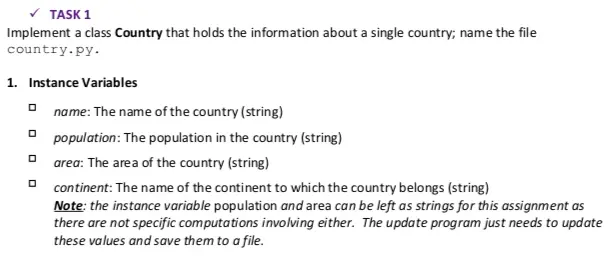
✓ TASK 1
Implement a class Country that holds the information about a single country; name the file
country.py.
1. Instance Variables
ㅁ name: The name of the country (string)
ㅁ
ㅁ
ㅁ
population: The population in the country (string)
area: The area of the country (string)
continent: The name of the continent to which the country belongs (string)
Note: the instance variable population and area can be left as strings for this assignment as
there are not specific computations involving either. The update program just needs to update
these values and save them to a file.
2. Methods
ㅁ
ㅁ
ㅁ
Constructor, __init__(self, name, pop, area, continent)
Getter Methods: getName, get Population, get Area, getContinent
Setter Methods: setPopulation, setArea, set Continent
def repr (self): generates a string representation for class objects.
Example of output from repr_
Name (pop: population value, size: area value) in Continent
e.g., Nigeria (pop: 11723456, size: 324935) in Africa
Test all your classes and methods before moving to the next section. Feel free to
create other helper methods if necessary.
TASK 2
Implement a class called CountryCatalogue; name the file catalogue.py.
This class will use a file to build the data structures to hold the information about countries. The file
data.txt contains information about a number of countries. An example of the data file is:
Country | Continent | Population | Area
Brazil South America | 193,364,000 18, 511, 965
Canada | North America | 34, 207, 00019, 976,140
China Asia 1,339,190,000 19,596,960
Colombia | 148,654,392 11,090,909
Egypt | Africa | 93,383,5741
Notice that:
There is a header line: "Country | Continent | Population | Area". This is really for
information purpose for the data file; it is a reminder of the format of the data in the file.
The file consists of "records" for each country-one per line with the information as described
in the header line.
The different "fields" of each "record" are separated by vertical bars, "|".
A field (except for country name) may be missing (see Colombia and Egypt) but the record will
still have the three vertical bars.
The class CountryCatalogue should have the following instance variable:
countryCat: This is a collection of countries, i.e., each member is an object of the class
Country. The collection could be a set, dictionary or list. It is important that the collection
store objects of type Country.
You may add other instance variables as you see fit.
>Methods
1. Constructor, init_(self, countryFile)
The constructor method will take a single parameter (besides "self") that is the name of the file
that contains the information about each country. The constructor will use the data in the file to
construct the data structure countryCat. Sample data files has been provided: data.txt and
data2.txt. [Note: Both files have headers and these files are meant for you to test your
program; they may NOT be the same used to evaluate your solution.]
2. Setter Methods: set Population Of Country, setAreaOf Country,
setContinent Of Country
3. find Country (self, country)
Given a country object (that is, an object of the Country class), this methods checks to see if that
country object is in countryCat. If it is, it just returns the country object, but if it is not, it
returns the null object NONE.
4. addCountry (self, countryName, pop, area, cont)
Given the name, population, area and continent of a country, this method adds a new country to
countryCat; it should only be added if the country does not exist in countryCat.The
method should return True if the operation is successful (country successfully added), or False if it
is not, e.g. the country they entered already exists.
5. print CountryCatalogue (self)
This method prints a list of the countries and their information to the screen; it should make use
of the repr method of the Country class.
6. saveCountryCatalogue (self, fname)
This method will enable all the country information in the catalogue to be saved to a file. The
method takes as a parameter the name of the file. All the countries should be sorted
alphabetically by name (A - Z) prior to saving. If the operation is successful, the method should
return the number of items written, otherwise it should return a value of -1. The file should
appear in the exact same format as the original file, namely:
Country Continent | Population | Area
Brazil| South America | 193,364,000 18, 511,965
Canada | North America | 34,207,000 19,976,140
China | Asia | 1, 339, 190, 00019,596,960
Egypt | 193,384,001 11,000,000
Indonesia||260,581,3451
Notice that:
There should be no spaces between the fields and vertical bars.
If a field has no value, then nothing should be printed, e.g. see Egypt and Indonesia with no
continent value and Indonesia with no area given.
You may add other methods as you see fit.
Test all your classes and methods before moving to the next section. Feel free to
create other helper methods if necessary.
✓ TASK 3
Implement a Python module, called process Updates.py, that has a function
processUpdates (entryFileName, updateFileName). This function takes two
parameters: the first parameter will be the name of a file containing country data (eg. data.txt).
The second file will contain the name of a file containing updates. Each record in the update file
specifies updates for a single country. The format of a record in the update file is as follows:
Country; updatel; update2; update3
Where an "update" is of the form "L-value" and L can be P, for population, A for area and C for
continent. Updates are separated by semicolons and a line can have 0, 1, 2 or 3 updates; any updates
after the first 3 are simply ignored and you need not worry about their values.
Valid values in an update are as follows:
ㅁ
For Population and Area, a valid value is a string of digits with commas separating groups of 3.
Examples of valid values are "123,456", "1,333,456", "23,333,444". Examples of invalid values
are "123456", "123 345 555", "123,344.44".
For Continent, a valid value is one of the continents: "Africa", "Antarctica", "Arctic", "Asia",
"Europe", "North America", "South America". The string of letters can be upper or lower case
and there may be more than one space between the "North" and "America" and the "South"
and the "America". Once a valid continent is found, the first letter of the name or parts
should be capitalized and there should only be 1 space between the "North" and "America"
and the "South" and the "America". For example, "asia" should be stored as "Asia", "aFRICA"
should be stored as "Africa", "north America" should be stored as "North America".
An example of an update file is:
Notice that:
ㅁ
Brazil; P-193,364, 111; A-8, 511,966
Indonesia; P=260,581,345
Japan; P=127, 380, 555; A-377,800
Sweden; P=9,995, 345;A-450,295; C = europe
Italy; P 59,801,999
Canada; C=North America
Egypt; A-1,000,000; P=93,384,001
France; P = 64,668,129; P=64,668,150; A-541, 666;C=Europe
The updates can be in different orders, e.g. the updates for Egypt are area first, then
population.
If a country is specified and that country is NOT already in the catalogue then that country and
its attributes (at least the ones specified; not all have to be specified) should be added to the
catalogue (again, any attributes beyond the first 3 are to be ignored).
There can be spaces before and/or after each semicolons and equal signs; these spaces can be
ignored.
There can also be spaces in other places, such as in country names or within numbers. These
represent errors and could cause problems in processing. You should treat these as errors (do
not try to fix them) and should be handled as exceptions (see below).
In the updates to France, for example, there are 4 updates; the last update is simply ignored
and your program should only consider the first 3. As well, the first three updates to France
contain two updates for population. These are applied in order. This would mean that the
update P = 64,668,129 is applied and then the update P=64,668,150 is applied, essentially
overwriting the first update.
The function processUpdates gets two files as parameters. The first parameter is the name of
the file with the country data and the second parameter is the name of file with the update data.
The country file should be processed first. The function processUpdates should ensure that it
exists. If it does exist, it should then proceed to process the data file using the class
CountryCatalogue. If the country file does not exist, then process Updates should give the
user the option to quit or not (prompts for "y" (yes) or "N" (no)). If the user does not wish to quit
(responds with "N"), then the function should prompt the user for the name of a new file. If the user
wishes to quit (responds with a "y" or anything other than a "N", then the method should exit and
return False. The method should continue to prompt for file names until a valid file is found or the
user quits.
If the user chooses to quit with no country file processed, then the function process Updates
should NOT try to process the updates file and should write to the file "output.txt" the message
"Update Unsuccessful\n" - just the single line. It should then exit (i.e.,) and return False.
If the function processUpdates has successfully processed the country file, then it should proceed
to process the file of updates. It should prompt the user in a similar manner to how the country file
was input, i.e., using a loop to continuously prompt the user until a file was found that existed or until
the user quits.
If the user quits without an update file being selected, then the function processUpdates should
write to the file "output.txt" the message "Update Unsuccessful\n" - just the single line. It
should then exit and return False.
If an update file is found, then the function processUpdates should process the updates, i.e.,
update the information about the countries and then output the new updated list of countries in
alphabetical order to the file "output.txt". The output should use the method
saveCountryCatalogue (self, fname) from the class CountryCatalogue (see Task 2).
It should then exit and return True.
In processing the updates from the update file, the updates may have invalid values (see above). If an
update has an invalid value, then the entire line should be skipped and none of the updates
processed. It is difficult to anticipate all possible problems with the updates, and some may cause
your program to fail - that is, some invalid inputs MAY cause exceptions when processing the line-
your program should be designed to catch any of these as exceptions and then print a message and
skip all processing of that line.
check_circle الجواب — حل مفصل خطوة بخطوة
hourglass_top
🔒
الحل الكامل متاح للمشتركين
اشترك في أرشيف الأسئلة لعرض هذا الحل وآلاف الحلول المفصلة خطوة بخطوة من معلمين معتمدين.