تم الحل ✓
categoryهندسة الحاسبات
schoolبكالوريوس
event_available2026-07-15
السؤال
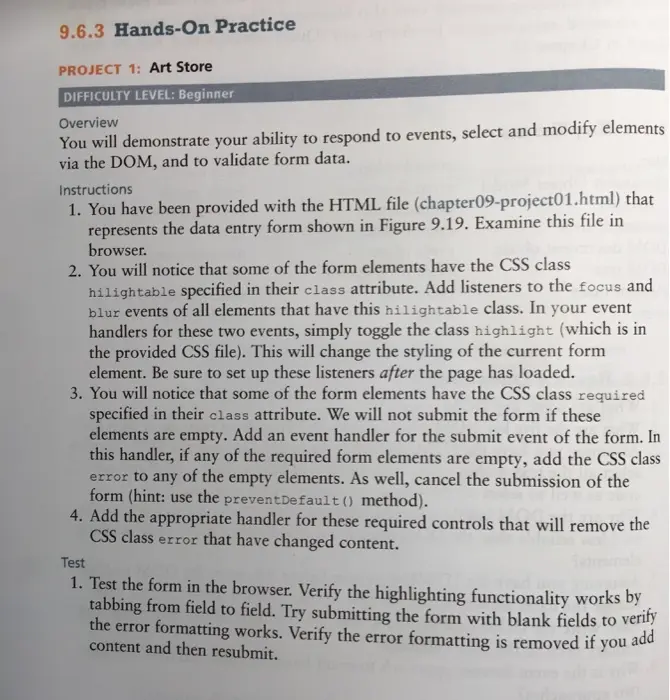
Transcribed Image Text:
9.6.3 Hands-On Practice
PROJECT 1: Art Store
DIFFICULTY LEVEL: Beginner
Overview
You will demonstrate your ability to respond to events, select and modify elements
via the DOM, and to validate form data.
Instructions
1. You have been provided with the HTML file (chapter09-project01.html) that
represents the data entry form shown in Figure 9.19. Examine this file in
browser.
2. You will notice that some of the form elements have the CSS class
hilightable specified in their class attribute. Add listeners to the focus and
blur events of all elements that have this hilightable class. In your event
handlers for these two events, simply toggle the class highlight (which is in
the provided CSS file). This will change the styling of the current form
element. Be sure to set up these listeners after the page has loaded.
3. You will notice that some of the form elements have the CSS class required
specified in their class attribute. We will not submit the form if these
elements are empty. Add an event handler for the submit event of the form. In
this handler, if any of the required form elements are empty, add the CSS class
error to any of the empty elements. As well, cancel the submission of the
form (hint: use the preventDefault() method).
4. Add the appropriate handler for these required controls that will remove the
CSS class error that have changed content.
Test
1. Test the form in the browser. Verify the highlighting functionality works by
tabbing from field to field. Try submitting the form with blank fields to verify
the error formatting works. Verify the error formatting is removed if you add
content and then resubmit.
hilightable fields
Chapter
C127.0.0.1-55082/Chapter09-project01 hom
Tale
Description
a
Edit Art Work Details
Genre
Choose genre
Type
Subject
Choose subject
Medium
Painting
Sculpture
image Creative Commons Specification
Attribution
Noncommercial
No Derivative Works
Share Alike
Year
Museum
Sub
Clear Forn
required fields
Chapter
C12700155092/Chapter09-project html
T
a
liandmuds
Edit Art Work Details
Description
Genre
Choose gere
Subject
Choose subject
Vedum
Type
Painting
Sculpture
image Creative Commons Specification
Attribution
Noncommercial
No Derivative Works
Share Alle
Add handlers for the focus
and blur events. These handlers
will toggle (add or remove) the
class highlight
Year
Museum
Clear From
Char
C12700155092/Chapter09-project01.html
净空
Edit Art Work Details
Title
Description
Painting
Sculpture
Genre
Туре
Choose gerve
Subject
Choose subject
Medium
Image Creative Commons Specification
Attribution
Noncommercial
No Derivative Works
Share Alike
year
Museum
Subrat
Clear Form
canbaweadld be
When user submits, if any of the
required fields is empty, then add
the class error to the required
elements
Finished Draint 1
Add handler for the submit event of the form
check_circle الجواب — حل مفصل خطوة بخطوة
hourglass_top
🔒
الحل الكامل متاح للمشتركين
اشترك في أرشيف الأسئلة لعرض هذا الحل وآلاف الحلول المفصلة خطوة بخطوة من معلمين معتمدين.