تم الحل ✓
categoryقواعد البيانات وإدارة البيانات
schoolبكالوريوس
event_available2026-07-15
السؤال
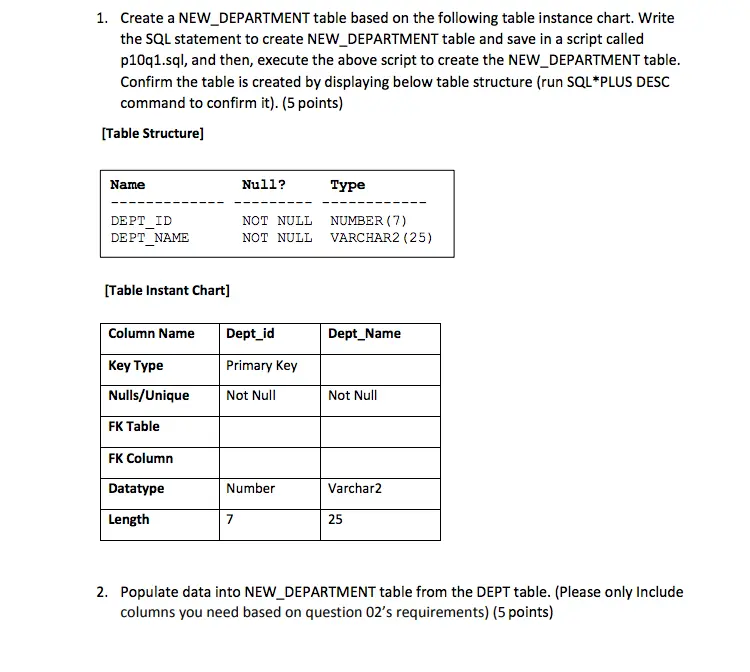
Transcribed Image Text:
1. Create a NEW DEPARTMENT table based on the following table instance chart. Write
the SQL statement to create NEW_DEPARTMENT table and save in a script called
p10q1.sql, and then, execute the above script to create the NEW_DEPARTMENT table.
Confirm the table is created by displaying below table structure (run SQL*PLUS DESC
command to confirm it). (5 points)
[Table Structure]
Name
Null?
Туре
DEPT ID
DEPT_NAME
NOT NULL
NUMBER (7)
NOT NULL
VARCHAR2 (25)
[Table Instant Chart]
Column Name
Dept_id
Dept Name
Key Type
Primary Key
Nulls/Unique
Not Null
Not Null
FK Table
FK Column
Datatype
Number
Varchar2
Length
7
25
2. Populate data into NEW_DEPARTMENT table from the DEPT table. (Please only Include
columns you need based on question 02's requirements) (5 points)
3. Create a NEW EMPLOYEE table based on the following table instance chart. Write the
SQL statement to create NEW_EMPLOYEE table and save in a script called p10q3.sql,
and then execute the script to create the table. Confirm the table is created by
displaying below table structure (run SQL*PLUS DESC command to confirm it) (5
points)
[Table Structure]
Name
Null?
Туре
EMP_ID
NOT NULL
NUMBER (7)
LAST NAME
FIRST NAME
NOT NULL
NOT NULL
DEPT ID
VARCHAR2 (25)
VARCHAR2 (25)
NUMBER (7)
[Table Instant Chart]
Column Name EMP_ID
LAST NAME FIRST_NAME DEPT_ID
Key Type
Primary Key
Nulls/Unique
Not Null
Not Null
Not Null
FK Table
NEW DEPARTMENT
FK Column
DEPT_ID
Datatype
Number
Varchar2
Varchar2
Number
Length
7
25
25
7
4. Modify the NEW_EMPLOYEE table to allow for longer width of employee last names
and first name. Confirm your modification to display below new table's structure. (5
points)
[Table Structure]
Name
Null?
Туре
EMP_ID
LAST NAME
FIRST NAME
NOT NULL
NOT NULL
NUMBER (7)
NOT NULL
VARCHAR2 (35)
VARCHAR2 (35)
DEPT ID
NUMBER (7)
5. Write a query statement to display the NEW_DEPARTMENT and NEW_EMPLOYEE
tables' table_name and status information from the data dictionary view. (Hint: use
USER_TABLES) (5 points)
[Table Structure]
TABLE_NAME
STATUS
NEW DEPARTMENT
VALID
NEW EMPLOYEE
VALID
6. Create the NEW_EMPLOYEE2 table based on the structure of the EMP table. The
NEW EMPLOYEE2 table includes EMPNO, ENAME, and DEPTNO columns. Name the
columns in the NEW_EMPLOYEES2 to ID, LAST_NAME, and DEPT_ID, respectively.
Confirm your new table's structure as below result. (5 points)
[Table Structure]
Name
ID
LAST_NAME
DEPT ID
Null?
Туре
NOT NULL
NOT NULL
VARCHAR2 (4)
VARCHAR2 (15)
VARCHAR2 (2)
7. Write your code to drop the NEW_EMPLOYEE table. (5 points)
8. Rename the NEW EMPLOYEE2 table to NEW_EMPLOYEE. (5 points)
9. Add a comment to the NEW_DEPARTMENT and NEW_EMPLOYEE tables by adding
describing information on the tables (e.g. 'Employee Information'. Or 'Department
Information'). (5 points)
10. Write a query to display comments on the NEW_DEPARTMENT and NEW_EMPLOYEE
tables from the data dictionary view. (Hint: USER_TAB_COMMENTS) (5 points)
PS: You need to format your comments column to a25 first; for example, SQL> COLUMN
comments FORMAT a25
[Table Structure]
Page 4
TABLE_NAME
NEW DEPARTMENT
NEW EMPLOYEE
COMMENTS
Department Information
Employee Information
11. Logically drop the LAST_NAME column from the NEW_EMPLOYEE table. Confirm your
modification by checking the structure of the NEW_EMPLOYEE table. (5 points)
12. Drop all the UNUSED columns from the NEW_EMPLOYEE2 table. Confirm your
modification by checking the structure of the NEW_EMPLOYEE table. (5 points)
check_circle الجواب — حل مفصل خطوة بخطوة
hourglass_top
🔒
الحل الكامل متاح للمشتركين
اشترك في أرشيف الأسئلة لعرض هذا الحل وآلاف الحلول المفصلة خطوة بخطوة من معلمين معتمدين.