تم الحل ✓
categoryهندسة الحاسبات
schoolبكالوريوس
event_available2026-07-15
السؤال
Transcribed Image Text:
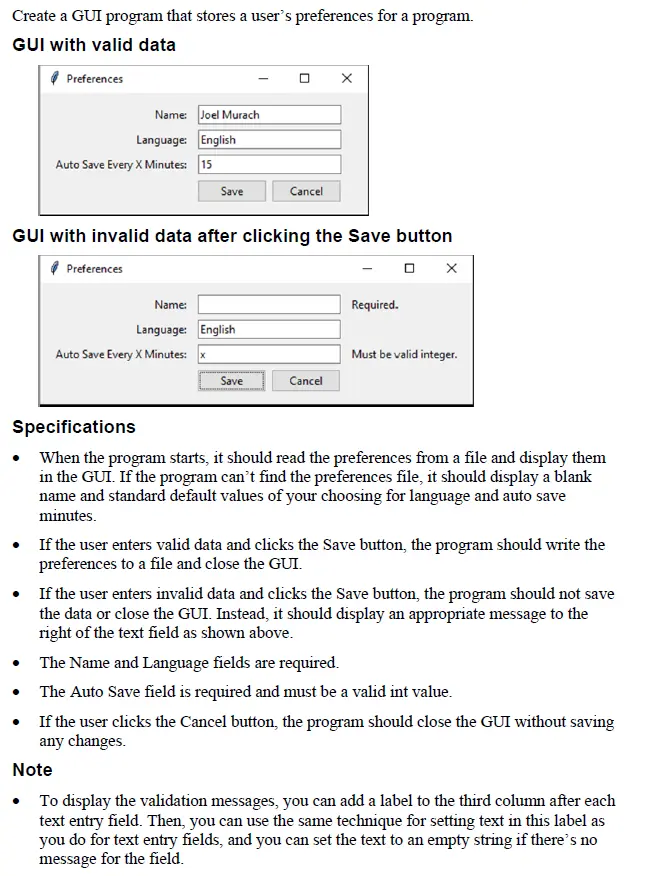
Create a GUI program that stores a user's preferences for a program.
GUI with valid data
Preferences
Name: Joel Murach
Language: English
Auto Save Every X Minutes: 15
Save
Cancel
GUI with invalid data after clicking the Save button
Preferences
Name:
Language: English
Auto Save Every X Minutes: X
Required.
Must be valid integer.
Save
Cancel
Specifications
When the program starts, it should read the preferences from a file and display them
in the GUI. If the program can't find the preferences file, it should display a blank
name and standard default values of your choosing for language and auto save
minutes.
If the user enters valid data and clicks the Save button, the program should write the
preferences to a file and close the GUI.
⚫ If the user enters invalid data and clicks the Save button, the program should not save
the data or close the GUI. Instead, it should display an appropriate message to the
right of the text field as shown above.
⚫ The Name and Language fields are required.
• The Auto Save field is required and must be a valid int value.
• If the user clicks the Cancel button, the program should close the GUI without saving
any changes.
Note
To display the validation messages, you can add a label to the third column after each
text entry field. Then, you can use the same technique for setting text in this label as
you do for text entry fields, and you can set the text to an empty string if there's no
message for the field.
check_circle الجواب — حل مفصل خطوة بخطوة
hourglass_top
🔒
الحل الكامل متاح للمشتركين
اشترك في أرشيف الأسئلة لعرض هذا الحل وآلاف الحلول المفصلة خطوة بخطوة من معلمين معتمدين.